• Untitled Document

    Join us on April 24th, 7pm EDT

    for the CBEC Virtual Meeting

    EY.o April Zoom Meeting

    All EYO members and followers are welcome to join the fun and get to know the people you've met online!

    See the link below for login credentials and join us!

    April Meeting Info

    (dismiss this notice by hitting 'X', upper right)

E32-200 AIS generally, Raymarine AIS700 specifically

Summary:

AIS transceivers are good - try to buy a 5 watt one. The Raymarine AIS700 will not, on its own, publish GPS location information to a Raymarine SeatalkNG network, and so any AIS avoidance alarms on the Raymarine SeatalkNG/NMEA 2000 network require an independent GPS input in addition to the Raymarine AIS700 itself.

AIS Systems Generally

International “Law Of The Sea” falls under the purview of the United Nations, a body interested in the safety of commerce and the ocean itself. The International Maritime Organzation (IMO) is the arm of the UN that helps guide the formation of international rules to govern shipping and prevent pollution. In order to help ships not run into one another, the IMO developed guidelines for the Automatic Identification System (henceforth AIS) and required big commercial boats to have AIS starting in the early 2000’s. AIS shall:
  • provide information - including the ship's identity, type, position, course, speed, navigational status and other safety-related information - automatically to appropriately equipped shore stations, other ships and aircraft;
  • receive automatically such information from similarly fitted ships; · monitor and track ships;
  • exchange data with shore-based facilities.
Registering an AIS system

For the casual boater / serious yachtsman / dude who goes sailing, there are really only two bureaucratic steps to take advantage of the AIS system

One must obtain a Maritime Mobile Service Identity number. This is a unique identifier (9 digit number) that identifies your boat among all the others. Registering for an MMSI number is free and can be done at the BoatUS web site.

The second step is to ensure that your MMSI number is programmed into your AIS device. In my admittedly limited experience the manufacturer or seller of your AIS system wants to do this programming for you, so that you do not screw it up.

Range and Reception

The primary range and reception of an AIS between transceivers is in a local context (floating on the ocean and not hitting one another).
A second range and reception is that satellites above the earth are constantly listening for AIS broadcast information (spies!). These services gather data and provide a means of tracking ships (and fixed objects broadcasting AIS signatures). It’s another way for your parents/spouse/children to keep track of you.
Marine Traffic is a good free site with this information.

Classes of AIS devices
Class A devices are for commercial ships. Big ships. They use a protocol called SOTDMA and transmit at 12.5 watts.

Class B devices are for recreational boaters. There are presently (2020) at least two types of Class B transmitters:

2 watt transmitting Class B devices were the norm until recently, and utilize a protocol called CSTDMA. In a few minutes of googling I was unable to determine if 2watt AIS can be picked up by satellites. This may or may not be the case.

5 watt transmitting Class B AIS devices are now available, and use SOTDMA (like the class A devices). This stronger broadcast signal and different technology increases the likelihood that a big ship will see your sailboat sooner and not run you over. It also makes your signal perceptible to satellites.

AIS System Types for small boats

Receiver vs. Transceiver

Ten years ago, you could buy an AIS receiver device that would listen for AIS information from other boats but not broadcast its own information.
In my cursory research, nearly all AIS devices that are sold today are transceiver devices that both receive AIS info from other boats and also transmit their own data. If one is interested in safety, I can’t imagine why one would not want to broadcast his/her own information (save for drug running, prize-fishing, or nautical-trysting).

Antenna Splitter vs. Independent
An AIS device needs an antenna to broadcast and receive information via VHF. One could set up an independent antenna, or use a “splitter” that allows the AIS to share the same antenna that one would use for his/her normal VHF radio antenna. It seems like most new AIS devices have integrated splitters, because setting up and maintaining an independent VHF antenna would be a hassle.

Form Factors
AIS integrated with VHF radio

Example: Standard Horizon GX2200 Available for sale for $350.

All AIS systems that rely on VHF radio waves for transmitting and receiving must (obviously) connect to a VHF antenna, and so having the electronics integrated into a radio makes a great deal of sense. This is an affordable way to get AIS benefits without a fancy data network and with minimal cost. Anyone replacing a radio who does not already have AIS should get one of these, IMHO. As for the utility of the AIS itself, one limitation of the solution is the small size of the screen that would show other incoming craft. I also have no idea whether setting alarms is difficult or easy.

Stand-Alone AIS with Integrated/dedicated Screen

Example: Vesper Watchmate 850
This type of unit usually has a larger display than would the radio-integrated type. They have the advantage of being a self-contained gadget in terms of setting alarms and otherwise dealing with AIS information. Everything is in one place.

Black Box AIS

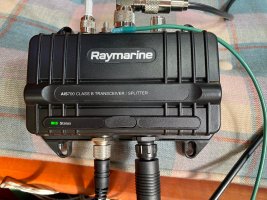
Example: Raymarine AIS700
5ycTiTMswqJS5vZ0vYa9h8nS5RJiNdMsTnaKs22tram4enM3Sn5neRPDC6hYoi1s-kifWtPmd28IQvH_9o7-qRwjjjxyfnqCuGrLWIXj1iF5iq_xUe0_1bxVOxdItIOVDui2ri6-

A black box is just that - beyond an LED indicator, there is no way for a user to interact directly with the device. An external screen/display or other means of input and output is needed in order to monitor the function of the system and make use of all of the data. In a modern networked system, this is not a big deal, assuming one has at least one Multi-Function-Display that can communicate with the AIS system.

Raymarine AIS700 Installation Review / My hero’s journey in not fully grasping the installation/instruction manual

I have written at length about my network design and installation. One of my early rules was to buy everything Raymarine so that it would all work together easily (lol, bro). What Raymarine offers for an AIS solution for recreational boaters is the AIS700. So I bought that.

GPS receiver chips are cheap and abundant. You have a GPS in the phone in your pocket. One can buy a GPS-to-USB antenna for his laptop for $17 on Amazon. My Standard Horizon boat radio has a GPS, my iPhone has a GPS, I learned after installing it, that my Axiom 9 MFD has a GPS chip. Every AIS system has a GPS too, and the AIS700 from Raymarine comes with an external mushroom antenna that can be mounted anywhere. I assumed that of all the GPS trackers on my boat, the AIS GPS would be the queen mother, the decider, the one and true GPS on which my network would rely.

This is not the case. The AIS700 does not “publish” its own GPS data to the SeaTalkNG network, so don’t plan for that. Here’s the hard way by which I reached this knowledge.

I planned my network installation. I installed everything carefully and took the boat out. The AIS turned on and had a happy green LED light.

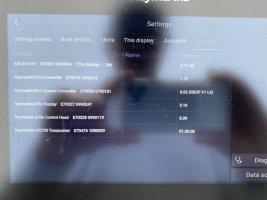
On my helm, I could see all sorts of AIS targets on my Axiom MFD chartplotter, and everything was good and right in the world. The AIS was known to my network on my list of devices.
X8Sl5oQ3JeuygG1t-EF--YxyS-DnsMxwMinRC6os6o22jqhaQR_MqcMowS6unOLBCbzNfQPT8o4hTuqVFiJJvol842lFrbJeg5fICkGFjfZdfsoZ30KX5mRbhAU_ctPEHVY7bYso


The Axiom 9 draws some power, and in my whole “I’m going to sail to Hawaii” scheme, I realized there would be long periods when I would want to shut off the MFD so as not to drain the battery. So, I shut off the MFD while I was out on a test sail.

Immediately, I got warning beeps and error messages “AIS SIGNAL LOST! GPS SIGNAL LOST!” BEEP BEEP BEEP! Naturally, I blamed myself. I realized that the Axiom was providing the GPS information to the network, so that must mean that the AIS wasn’t able to get a signal by itself from its own GPS antenna, right? (Wrong.)

The AIS700 comes with an external mushroom antenna that connects to the AIS via a small coaxial cable. This would be vital in a metal boat with a hull that would prevent GPS reception. In planning my network upgrade, for my AIS external GPS antenna placement I had decided I would try to copy Craig’s clever “Hide it under the dodger” placement. This entailed drilling a new hole in my hull (horrors) and running the antenna coaxial cable down through my head into the nav station and “server cubby” where my AIS would dwell. I had to cut off the coax connector to run the cable, and then re-attach it. I wrote elsewhere about my “learning to connect coax” experiences. I had done the larger PL259’s for the VHF antenna, but I must have screwed up this little RG6 to TNC connector.

I tried crimp connectors. I bought them on Amazon and waited for them to arrive. I had purchased the wrong kind of connectors, so I ordered again.

I tried to be fastidious with my installation. Yet, the AIS had the same problems (the network Alarms on my i70 MFD not working when I shut off the Axiom, indicating it had no GPS location.)

I contacted Raymarine. I registered for their forum. I did not get a response back from Raymarine. I could not view my query on their forum.

I tried again with a different connector. I bought a solder-type TNC from my local electronics shop. I soldered carefully. Same thing. Same problem, shut off the Axiom MFD and the AIS data would disappear. I blamed myself.

Then I blamed Raymarine again. I tried to contact them again. I did not get a response back.

Frustrated, I decided that I couldn’t make the AIS work properly, and I took the AIS back to West Marine, from whom I had purchased it. The employees at West Marine had some reluctance to take back the device. The transceiver had been custom-programmed with my MMSI, and I think represents more of a hassle than when an immediately-resalable item is returned.

“Let us try to contact Raymarine for you and see what is going on,” they said.

Fair enough. I took my gadget home. I didn’t really want to return it in the first place. I had it all wired in and it seemed to be working, (except when it didn’t.) I waited for a week for someone from West Marine to call me back.

No one from West Marine called me back.

I went in again to the store. Raymarine had not called West Marine back, either. This time, they accepted the device and refunded my money.

Again, I hadn’t really wanted to return the item. My network was all happy and Raymarine. Was it my particular unit that had a problem? Had I irretrievably botched the antenna somehow? I swallowed my pride and logic, and re-purchased the same unit, this time from Defender Marine. It arrived several days later and I plugged it into the boat.

Same problem. I did not cut the coaxial to run it through my desired placement location. It simply didn’t work, even brand new out of the box.

Something did not make sense. I tried contacting Raymarine again. I received a message about the company upgrading their customer support software and after a few more days, received a response from an actual person.

I paraphrase, but the suggestion was, “If you think your external GPS antenna for your AIS700 is not working, please install the ProAIS diagnostic software to verify your satellite reception. (Here is an example of a peril of “black box” AIS transceivers. The only way for me to verify satellite reception is with a fully fledged application on an external PC.)

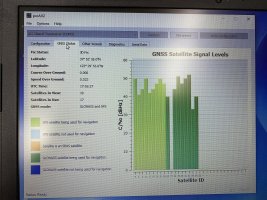
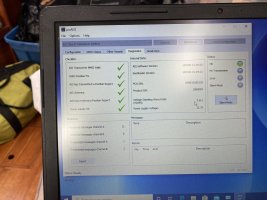
I downloaded the software, installed it on my laptop (another afternoon, another exercise). I found the right USB to micro-USB connector cord to allow my laptop to talk to the AIS700. The basket of old USB cords in the basement finally paid off. Plugged it in and everything seemed in order:

-rbOBNj_gpPDZAk5mZKs1Z8ubduhFnf5OdhRZ7YQpHvsXaCqas7CHKZ98CO8V1fdtGUdx1gb6rw8xeyJ8tJ4Rgo2xu2tcJyh87-69L1ouM3Q-4UNc0R5jFwEdovrp3H1rs3wDh1s

Robust signals from many GPS satellites:

v9owfD_ibF571gfoweJdNc-VoxOsw1wbK0iBcyPjnLvbyA2BZpwZfUb6otHSwjd6INYB0uDzWEZEk9EzrqbmOjFoVDDNWIizxDceZKaR08eXP_b7SCB7KTSGNxJ0Uuc9oO6EJ30Z


I reported my confounding (good satellite signals to AIS - no alarms without MFD) results to my Raymarine Customer Support person, and the response was, paraphrased:

“Oh, right sir. That’s the way it’s supposed to work. It says so in the installation manual.”

It says so in the installation manual? Hold on there a minute tiger. Let’s see what that actually means. This is what ‘in the installation manual’ means:

QbhnkjHJLYW9p64y0etsVZobFzrKbrsI77umnx7j0uK6JpqpPx0MzVzLEI6hZwnOFjVjpQ4ufaNotqAl8ebJtZGjFbcCZ0Fi4E7bLO9tjp5vBMeuj_b6r8x5GC4WzKjtUOo-vCyN


I don’t have the paper manual in front of me as I write today and the watermark from the web site from which I found the relevant page is obscuring the grid somewhat, but hopefully you can probably still get the gist.

This grid is to my mind, a for-engineers, by-engineers way of explaining the circumstances. GNSS is equivalent to GPS (it’s a broader definition of satellite location systems that includes some other than the US GPS system). I was supposed to look at this chart and infer that of course my AIS alarms wouldn’t work, because the alarm algorithms need both the received-AIS signals from the AIS700 and an independent GPS signal from elsewhere in the network. That’s why my AIS alarms work fine when my Axiom MFD is on and publishing a GPS location but the alarms don’t work when only the AIS is on, even though the AIS is sending and receiving AIS and GPS location from its own dedicated GPS antenna. The AIS info datastream is separate from a GPS location datastream, and both streams must be present for alarm and data viewing algorithms to work.

“Dude, what?”

[My coaxial soldering/crimping was never the problem.]

“Dude, you sold me this $1,000 box with an external antenna that knows where it is from 10 GPS satellites and connects to the Raymarine network, but it can’t actually tell the network where it is?”

[I went through all that rigamarole with West Marine and Defender and wasted those poor guys' time.]

“Dude.”

A co-worker once made fun of me because when I was agitated, I would substitute a verbal "DUDE" for most punctuation.

The answer from Raymarine is that if I want to run my AIS alarms without powering up the Axiom MFD, I should (wait for it) buy another Raymarine gadget, the RS150 GPS compass. This unboxing video shows it has a SeatalkNG spur cable, and operates as its own thing on the network.


So that’s what I’ve done - ordered the second $250 (ahem, cheap and abundant) GPS antenna. I’m obviously a bit peeved I have to run two GPS antennas for the AIS system to trigger alarms. It seems like other systems don’t work that way. Having written this account, I am annoyed at how much time I burned on this issue.

The upside is, my antenna testing in the boat has revealed that I get excellent reception below decks with my external GPS antenna. I think I can skip the dodger-mounted placement and just keep both antennas in the cabin. Also, this alarm algorithm aside, my AIS700 does play well with my network and I can get Over-The-Air software updates for it via the Axiom. I can control the AIS and see targets both from my small i70 MFD screen and my larger Axiom MFD.

What I really need to do is get everything put back together and the boat re-rigged to do some sailing(!)

Onward.
  • IMG_8900 (1).JPG
    IMG_8900 (1).JPG
    329.8 KB · Views: 3,309
  • IMG_9087.JPG
    IMG_9087.JPG
    387.3 KB · Views: 371
  • IMG_9089.JPG
    IMG_9089.JPG
    242.9 KB · Views: 355
  • IMG_9093 (1).JPG
    IMG_9093 (1).JPG
    173.4 KB · Views: 368

Blog entry information

Author
goldenstate
Views
2,039
Comments
6
Last update

More entries in Electronics - Navigation, Audio and Other

More entries from goldenstate

Top