
Preface
I'm currently testing Orca Navigation on my boat. My tests are interrupted by the work on Rumour's bottom and keel, so I thought I would place a summary of what I've found so far in the forums. I started writing a few pros and cons, which then led to feature analysis. The more I learned, the more I wrote. It wasn't long before I exceeded the 10,000 character limit for a forum post. So, here we are in the blogs.Orca has been discussed lightly here before:
https://ericsonyachts.org/ie/threads/navionics-alternative-orca-chartplotter-ipad.21593/
Background
It seemed like the more Raymarine components I added, the less functional the system became. The two displays mirror each other through an Cat5e cable signaled with Ethernet, but only one of them can be the "master" with the charts installed. This means the one display has to be powered up for the other display to work. Or, I have to pay for two sets of charts on MicroSD cards and let go of the mirroring functionality. The corporate consolidation of "Garminonics" has resulted in fewer features and more problems. Syncing between the Navionics mobile app and Raymarine functions about 6% of the time. Garmin removed the web chart viewer. The networking on the Axiom displays never quite works with Starlink or other WiFi networks that have access to the Internet. When I upgraded to LightHouse v4, I did so using a MicroSD card. Lately, the Axiom Pro has started going into a reboot loop, which results in having to "wipe and factory reset" the device.
There are workarounds for some of these puzzles. They result in an unwieldy Rube Goldberg-esque combination of apps and devices.
What I Want
Simply put: a navigation system which works.I want a product which is actively developed with new features and fixes, not left dormant or subject to retrogressive deprecations. It should have a clean interface, and share routes and data across other navigation instruments, mobile devices, and laptops. Charts should be easy and affordable to manage. I'd like it to integrate with the other instruments on the boat and have the ability to configure custom dashboards. I'd like to route plan on a laptop and then have the routes appear on my chart displays without hassle.
Enter Orca Navigation
Orca is produced in Oslo, Norway, a region well known for their seafaring culture. The application, which is beautiful, clean, and intuitive to understand, runs on Android, iPhone/iOS, Mac OS, and the Orca Display 2. The app can be used by itself with no boat integration, which is similar in functionality to the Navionics mobile app.Things get interesting when you add an Orca Core 2 to the boat. The Core 2 connects with a single NMEA2000 cable, and, in exchange, it becomes a wireless bridge between all NMEA2000 data available. The app on a phone, tablet, or Mac laptop can now use live sensor data in charts, custom instrument dashboards, and automatic routing. Add an internet connection, like Starlink or a mobile hotspot, and there's a bridge to the Internet for the entire boat. It only gets better from here.
Feature Comparison
Marketing Doesn't Tell the Whole Story
Here's a brief side-by-side comparison of features, based on summary marketing literature.| Feature | Raymarine Axiom (w/ Navionics) | Orca (Core 2 + Display 2) |
|---|---|---|
| Primary Charting | Navionics (Vector/Raster/Sonar) | Orca Charts (High-detail proprietary) |
| NMEA 2000 Connectivity | Direct (DeviceNet or SeaTalkng) | Via Orca Core 2 (Wireless bridge) |
| AIS Functionality | Target overlays, CPA/TCPA alarms | Smart AIS (Collision avoidance/Rerouting) |
| Anchor Alarm | MFD-local; Audio/Visual on screen | Cloud-synced; Remote phone alerts |
| Remote Access | RayConnect / RayRemote apps | Native remote monitoring (Cellular/Wi-Fi) |
| Autopilot Control | Native/Direct via SeaTalkNG | Full control (via Core 2 integration) |
| Recorded Tracks | Basic track history, Manual | Automated smart logbook, w/polars, graphs |
| Hardware Display | Dedicated MFD (Rugged/Physical buttons) | Marinized Tablet (High-res/Touch-centric) |
After playing with the system a little bit, the table above doesn't do the comparison any justice. Certain features on the Orca are a world apart from "Rayvionics".
Track recording on the Orca Core 2 occurs automatically. If the Core 2 is powered up and the boat moves more than 50m, Orca starts recording the GPS track of the boat. It also records all the NMEA metrics, like wind speed, wind direction, wave state, and bearing and can graph this data over time. It records polars for the boat, which can be used in automated sailing routes. The user can review this historical track in segments or all together. You can also tell it to "start a track from now" if you so desire.
I guess that's why Orca calls the feature "Logbook" and makes no mention of "track recording." It records the entire history of the vessel's movement. All of the data is synced from the Core to all connected devices and apps, and the Core syncs all of this to Orca's Cloud when an Internet connection is present. GPX export for tracks is just a button click in Logbook.
I Shouldn't Be This Excited
It's 2026. The features described in this article should not be points of excitement. With the proliferation of wireless technologies, fast charging capabilities, and general software development, these features should be table stakes for any marine navigational system. But, here we are. I'm still excited.Introducing the Orca Display 2
The Display 2 is a 10" Android tablet which has been marinized -- it's waterproof, shockproof, and viewable in bright sunshine, even with polarized sunglasses. The Orca app looks exactly the same as on a mobile device or laptop and it connects automatically to the Orca Core 2 with WiFi and Bluetooth. My Axiom 9+ looks horrible in the sunshine with polarized glasses on, especially from extreme angles. It automatically changes to night vision mode when the ambient light folds into darkness. On the Axiom, one must follow a series of non-intuitive swipes and soft key presses to achieve night vision. Good luck changing it back in the bright sunlight tomorrow morning.The Display 2 can be fast charged with USB-C or wirelessly charged at 25W with the Orca Charging Mount. The Charging Mount can be surface-mounted or top-mounted and includes a heavy duty locking mechanism so the Display won't go flying from its perch.
Since it's an Android tablet underneath, any app can be loaded from the Google Play Store, like Windy, PredictWind, a tides app, or Netflix (yes, it has speakers too).
Route Planning on Steroids
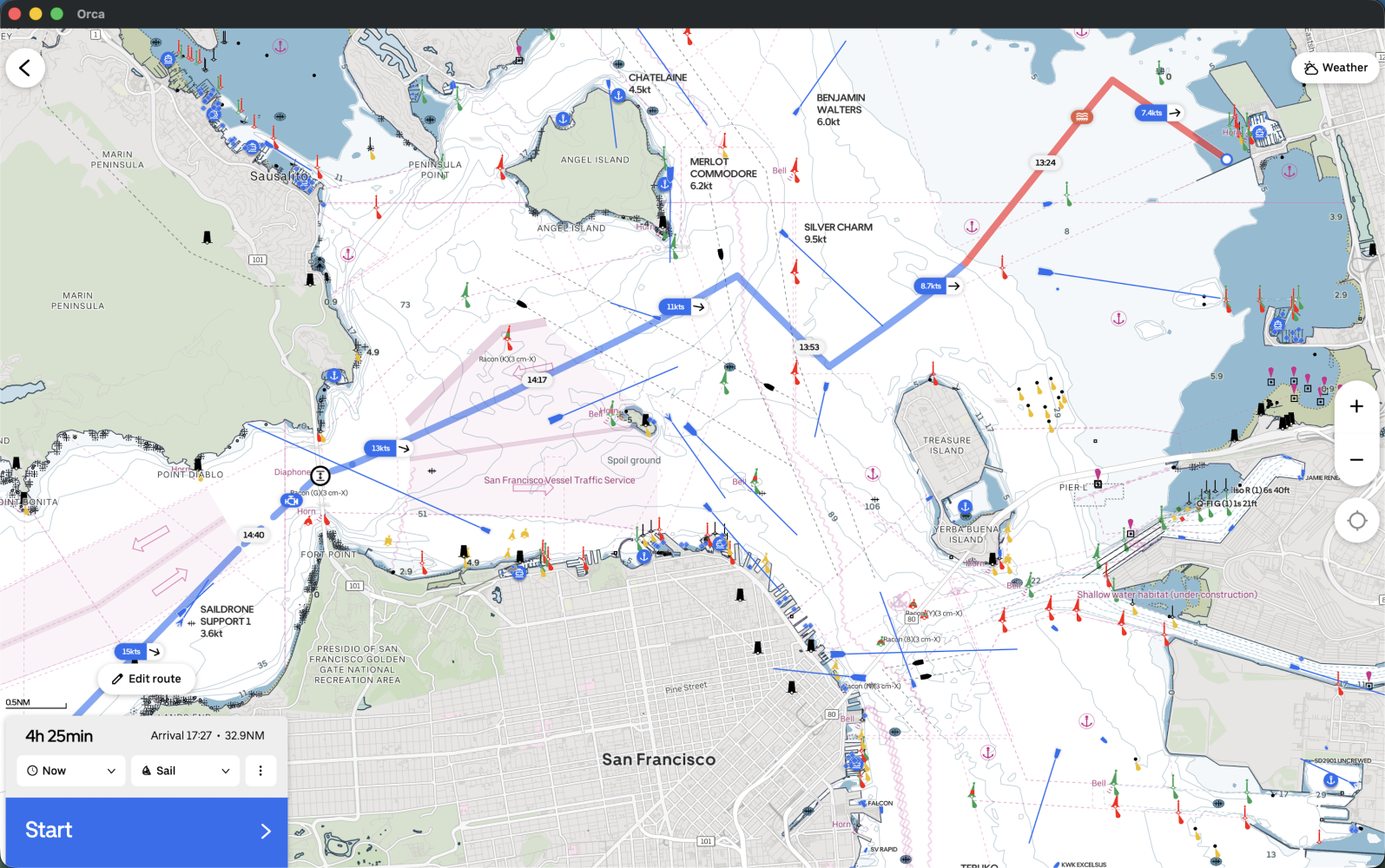
Route planning begins with an origin and a destination. From there, Orca will automatically route your boat in three modes: sailing, motoring, or manual. If you have another brand of chartplotter, you're already used to manual route planning. When you choose sailing mode, Orca takes into account wind, sea state, land masses, and AIS targets to create a sailing plan for you.Along the route, you'll notice indications of wind speed and even places where it suggests you motor to get through a calm. This automatic route also adjusts automatically as the conditions change.
Manual routing is always available by switching modes. Adding waypoints is intuitive through a long-press on the screen along the existing route and then dragging to the new waypoint.
Anchor Alarm
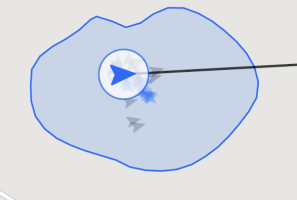 Instead of a traditional anchor alarm, Orca created something called Guard Mode. When it's enabled on a boat equipped with the Core 2, you draw a shape around your boat. Any shape you like. If Orca detects the boat outside your boundary lines, it will alert the app. If your Orca is connected to the Internet, then you can get these alerts even when you're off the boat. The Orca Core 2 utilizes a dual-band L1+L5 GNSS receiver which is accurate down to half a meter (50cm).
I'm sure you're wondering how much extra this feature costs. It's included with the Smart Navigation annual subscription.
What Do You Mean It Will Automatically Ignore My Vessel's MMSI?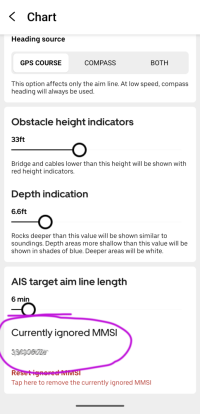
An AIS Transponder on your boat will broadcast your MMSI and some data about your vessel. Transponders also receive MMSI data about other boats (along with some VHF radios). One would think a chartplotter which has the ability to show AIS targets on a chart and throw alerts would be able to ignore the vessel's own MMSI. Otherwise, your own boat would be alerting you about your own boat with constant false positives. So, you would probably just disable the TCPA/CPA alerts.I just described my 21 day journey delivering a boat from Hawaii to SF last summer. The boat had modern B&G electronics and none of the three of us aboard could figure out how to ignore our own MMSI. My experience with Raymarine on my own boat is the same.
Upon reading support articles around this topic, the entire industry is confused. AIS Transponder makers say chartplotters are responsible for filtering MMSIs. Chartplotter makers point back at AIS Transponders. I believe filtering is the role of the device or software displaying and alarming on the data. AIS Transponders and VHF radios are essentially data collectors and should not be responsible for manipulating the data before it lands on the NMEA network.
Orca ignores the MMSI of the boat on which it's installed. And, it does so automatically. Thank you, modern software development.
Boat WiFi That Makes Sense
I could never quite figure out how to connect the Axiom displays to the Internet, have my mobile device connected to the displays, and still have my mobile device connect to the internet through the Starlink. As a former network engineer, I know there's a solution that involves stringing CAT5e cable between displays, installing an Ethernet hub, and making some other connections. Or, one could buy a Raymarine YachtSense Router for $1200. It's frustrating that all the chartplotters already have the necessary wireless hardware. Companies like Raymarine won't write the software because they want to make money selling more equipment.With Orca, everything just works. I turn on my Starlink and connect to the Internet through the Starlink WiFi. My mobile devices do as well. If the Starlink is powered down, the devices on the boat continue working with the Orca Core 2 and each other. There are no extra WiFi networks to join or manual changes needed on devices.
Of Course It Controls Your Autopilot
Most modern autopilots welcome. And, the control can happen from any device that runs the Orca app, including an Apple Watch.https://help.getorca.com/en/articles/6533855-which-autopilots-are-supported-in-orca
Cost Breakdown
I'll compare buying the equipment I already have installed on Rumour at today's prices, even though I certainly paid more when I initially purchased them. There is currently an Axiom+ 9 at the helm and an Axiom Pro 9 at the nav station. Note: The Axiom Pro 9 has been replaced by the Axiom2 Pro 9, which is more expensive. The comparison of prices below reflects a like-for-like replacement with Orca.Prices are written in approximate USD ($) based on current exchange rates at the time of this article. Keep in mind Orca products are priced in Euros (€).
Initial Equipment Costs
| Raymarine | Cost | Orca | Cost |
|---|---|---|---|
| Axiom+ 9 | $1200 | Display 2 | $1000 |
| Axiom Pro 9 | $2000 | Display 2 | $1000 |
| Navionics+ Charts (1) | $150 | Charging Mount | $300 |
| Charging Mount | $300 | ||
| Core 2 | $600 | ||
TOTAL | $3350 | TOTAL | $3200 |
Recurring Costs
| Navionics+ Charts | Cost | Orca Charts | Costs |
|---|---|---|---|
| Regional Chart Renewal | $75/year | Smart Navigation (3) Up to 5 Devices Worldwide Coverage | $160/year |
| Mobile App (2) | $50/year | ||
TOTAL | $125/year | TOTAL | $160/year |
Initial equipment is very reasonably priced when compared to today's chartplotter prices. For the setup on Rumour, the two displays become exact replicas. There's no longer any need to hard wire a display to a specific install location. I really like that kind of redundancy. For others, this may save initial costs, since multiple charging mounts can be installed on the boat and one display can be moved where it's needed.
Annual recurring costs go up slightly with the Smart Navigation package, by $35.
Initial Takeaways
General Thoughts
The entire system appears to be an excellent choice for cruising. Orca's ability to use multiple sources of data, both on and off the vessel, make a compelling case for creating well-informed sailing routes. Orca won't obviate the need to examine weather forecasts or isobar charts when planning a trip. Once on the water, it could influence good decisions.Orca is not a race instrument system. It will operate in harmony next to race-style instruments, such as B&G. There are no race start timers or other features. The automatic routing features would be a violation of most sailboat racing SI's and NOR's, due to the paid nature of the service.
What I Like
Orca is an impressive system at a reasonable cost. This becomes especially true when I compare the broken functionality of the Raymarine/Navionics solution with all the extra features of Orca for only $35 more a year. The initial investment cost is even less for Orca and the displays are exact replicas with no special cabling other than a charging mount with only two wires.If one of the Axiom's were to fail under way on a cruise, I would potentially need to swap the SD card to the functioning unit and that unit would be immovable. Both the Orca displays can be instantly moved or swapped. Even if both Orca Displays were broken, I could still use my mobile device or laptop with no loss of functionality.
What's Missing?
AIS AlertingI'd like to see audible user-defined AIS CPA/TCPA alerts in Orca. Orca takes a different approach by preventing close-proximity through auto-routing around AIS targets. This works for day trips and coastal jumps, when someone is always on deck or watching the instruments -- not as useful for a single-hander crossing the Pacific who needs to sleep. I reached out to Orca Support and asked about the feature. Here's their response:
Thank you for reaching out to us ! And I am happy to hear you are enjoying Orca 
For the time being, this is not something that we have included in our short term roadmap, however, I linked this conversation to a preexisting ticket regarding AIS audible alarms so that if this is developed in the future you will be the first to be notified!
Since Orca works alongside other navigation electronics, another device can provide this alert feature. One solution is to use a device called NavAlert. The device has an anchor alarm, AIS CPA/TCPA alerts, and can alert on other NMEA data. An internal 90dB alarm and a mute switch are included in the single unit. See: https://digitalyachtamerica.com/product/navalert/
I currently have some Raymarine p70 instrument displays surface mounted on the cockpit bulkhead and those have AIS CPA/TCPA alerts. Because they are surface mounted, the back side protrudes into the cabin where the alarm can be heard very readily. This might be my solution for now.
Backup Internet Connectivity
The Orca Core can be configured to use an Internet-reachable WiFi network to pull weather, AIS, and sync to the Orca cloud for things like Logbook. I use Starlink as my primary Internet connection and either my mobile hotspot or Iridium Go Exec as a backup. It would be a nice feature if the Core could be configured for multiple WiFi SSID's.
What's Next?
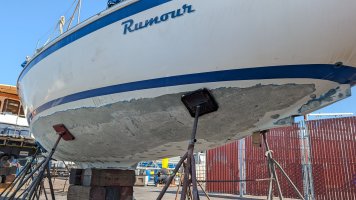 After Rumour has her keel bolted back on, I'll be able to test Orca more on the water.
Has anyone else had any experience with Orca Navigation? I'd love to hear your thoughts in the comments below.
Cheers and happy navigating!


